Upgrade to 3.3 and 7.3
1. Upgrade From 7.2.2.2 to 7.3
RDAF Platform: From 3.2.2.2 to 3.3
OIA (AIOps) Application: From 7.2.2.2 to 7.3
RDAF Deployment rdaf & rdafk8s CLI: From 1.1.9.2 to 1.1.10
RDAF Client rdac CLI: From 3.2.2.2 to 3.3
1.1. Prerequisites
Before proceeding with this upgrade, please make sure and verify the below prerequisites are met.
-
RDAF Deployment CLI version: 1.1.9.2
-
Infra Services tag: 1.0.2,1.0.2.1(nats, haproxy)
-
Platform Services and RDA Worker tag: 3.2.2.2/3.2.2.3
-
OIA Application Services tag: 7.2.2.2
-
CloudFabrix recommends taking VMware VM snapshots where RDA Fabric infra/platform/applications are deployed
-
RDAF Deployment CLI version: 1.1.9.2
-
Infra Services tag: 1.0.2,1.0.2.1(nats, haproxy)
-
Platform Services and RDA Worker tag: 3.2.2.2/3.2.2.3
-
OIA Application Services tag: 7.2.2.2
-
CloudFabrix recommends taking VMware VM snapshots where RDA Fabric infra/platform/applications are deployed
For FSM Pre-Upgrade & Post-Upgrade steps Click Here
Useful Information
Warning
Make sure all of the above pre-requisites are met before proceeding with the upgrade process.
Warning
Kubernetes: Though Kubernetes based RDA Fabric deployment supports zero downtime upgrade, it is recommended to schedule a maintenance window for upgrading RDAF Platform and AIOps services to newer version.
Important
Please make sure full backup of the RDAF platform system is completed before performing the upgrade.
Kubernetes: Please run the below backup command to take the backup of application data.
Run the below command on RDAF Management system and make sure the Kubernetes PODs are NOT in restarting mode (it is applicable to only Kubernetes environment)
Warning
Make sure all of the above pre-requisites are met before proceeding with the upgrade process.
Warning
Non-Kubernetes: Upgrading RDAF Platform and AIOps application services is a disruptive operation. Schedule a maintenance window before upgrading RDAF Platform and AIOps services to newer version.
Important
Please make sure full backup of the RDAF platform system is completed before performing the upgrade.
Non-Kubernetes: Please run the below backup command to take the backup of application data.
Note: Please make sure this backup-dir is mounted across all infra,cli vms.- Verify that RDAF deployment
rdafcli version is 1.1.9.2 orrdafk8scli version is 1.1.9.2 on the VM where CLI was installed for docker on-prem registry and managing Kubernetes or Non-kubernetes deployments.
- On-premise docker registry service version is 1.0.2
- RDAF Infrastructure services version is 1.0.2 (
rda-natsservice version is1.0.2.1andrda-minioservice version isRELEASE.2022-11-11T03-44-20Z)
Run the below command to get RDAF Infra services details
- RDAF Platform services version is 3.2.2.2 / 3.2.2.3
Run the below command to get RDAF Platform services details
- RDAF OIA Application services version is 7.2.2.2
Run the below command to get RDAF App services details
Run the below command to get RDAF Infra services details
- RDAF Platform services version is 3.2.2.2 / 3.2.2.3
Run the below command to get RDAF Platform services details
- RDAF OIA Application services version is 7.2.2.2
Run the below command to get RDAF App services details
RDAF Deployment CLI Upgrade:
Please follow the below given steps.
Note
Upgrade RDAF Deployment CLI on both on-premise docker registry VM and RDAF Platform's management VM if provisioned separately.
Login into the VM where rdaf & rdafk8s deployment CLI was installed for docker on-prem registry and managing Kubernetes or Non-kubernetes deployment.
- Download the RDAF Deployment CLI's newer version 1.1.10 bundle.
- Upgrade the
rdaf & rdafk8sCLI to version 1.1.10
- Verify the installed
rdaf & rdafk8sCLI version is upgraded to 1.1.10
- Download the RDAF Deployment CLI's newer version 1.1.10 bundle and copy it to RDAF management VM on which
rdaf & rdafk8sdeployment CLI was installed.
- Extract the
rdafCLI software bundle contents
- Change the directory to the extracted directory
- Upgrade the
rdafCLI to version 1.1.10
- Verify the installed
rdafCLI version
- Extract the
rdafCLI software bundle contents
- Change the directory to the extracted directory
- Upgrade the
rdafCLI to version 1.1.10
- Verify the installed
rdafCLI version
- Download the RDAF Deployment CLI's newer version 1.1.10 bundle
- Upgrade the
rdafCLI to version 1.1.10
- Verify the installed
rdafCLI version is upgraded to 1.1.10
- To stop application services, run the below command. Wait until all of the services are stopped.
- To stop RDAF worker services, run the below command. Wait until all of the services are stopped.
- To stop RDAF platform services, run the below command. Wait until all of the services are stopped.
- Download the RDAF Deployment CLI's newer version 1.1.10 bundle and copy it to RDAF management VM on which
rdaf & rdafk8sdeployment CLI was installed.
- Extract the
rdafCLI software bundle contents
- Change the directory to the extracted directory
- Upgrade the
rdafCLI to version 1.1.10
- Verify the installed
rdafCLI version
- Extract the
rdafCLI software bundle contents
- Change the directory to the extracted directory
- Upgrade the
rdafCLI to version 1.1.10
- Verify the installed
rdafCLI version
1.2. Download the new Docker Images
Download the new docker image tags for RDAF Platform and OIA Application services and wait until all of the images are downloaded.
Note
Neo4j graphdb service is optional, please skip this step if this service is not needed.
Run the below command to verify above mentioned tags are downloaded for all of the RDAF Platform and OIA Application services.
Please make sure 3.3 image tag is downloaded for the below RDAF Platform services.
- rda-client-api-server
- rda-registry
- rda-scheduler
- rda-collector
- rda-identity
- rda-fsm
- rda-access-manager
- rda-resource-manager
- rda-user-preferences
- onprem-portal
- onprem-portal-nginx
- rda-worker-all
- onprem-portal-dbinit
- cfxdx-nb-nginx-all
- rda-event-gateway
- rda-chat-helper
- rdac
- rdac-full
Please make sure 7.3 image tag is downloaded for the below RDAF OIA Application services.
- rda-app-controller
- rda-alert-processor
- rda-file-browser
- rda-smtp-server
- rda-ingestion-tracker
- rda-reports-registry
- rda-ml-config
- rda-event-consumer
- rda-webhook-server
- rda-irm-service
- rda-alert-ingester
- rda-collaboration
- rda-notification-service
- rda-configuration-service
- rda-alert-processor-companion
Please make sure 7.3.0.1 image tag is downloaded for the below RDAF OIA Application services.
- rda-event-consumer
Please make sure 7.3.2 image tag is downloaded for the below RDAF OIA Application services.
- rda-alert-ingester
Downloaded Docker images are stored under the below path.
/opt/rdaf/data/docker/registry/v2
Run the below command to check the filesystem's disk usage on which docker images are stored.
Optionally, If required, older image-tags which are no longer used can be deleted to free up the disk space using the below command.
1.3.Upgrade Steps
1.3.1 Upgrade RDAF Infra Services
RDA Fabric platform has introduced supporting GraphDB service in 3.3 release. It is an optional service and it can be skipped during the upgrade process.
Download the python script (rdaf_upgrade_1192_1110_without_graphdb.py) if GraphDB service is NOT going to be installed.
wget https://macaw-amer.s3.amazonaws.com/releases/rdaf-platform/1.1.10/rdaf_upgrade_1192_1110_without_graphdb.py
Please run the downloaded python upgrade script.
It generates a new values.yaml.latest with new environment variables for rda_scheduler infrastructure service.
Tip
Please skip the below step if GraphDB service is NOT going to be installed.
Warning
For installing neo4j GraphDB service, please add additional disk to RDA Fabric Infrastructure VM. Clicking Here
It is a pre-requisite and this step need to be completed before installing the neo4j GraphDB service.
Download the python script (rdaf_upgrade_1192_1110.py) if GraphDB service is going to be installed.
Please run the downloaded python upgrade script.
It generates a new values.yaml.latest with new environment variables for rda_scheduler infrastructure service and /opt/rdaf/config/network_config/config.json file appended with neo4j GraphDB infra service
Once the above python script (with or with-out GraphDB configuration) is executed it will create /opt/rdaf/deployment-scripts/values.yaml.latest file.
Note
Please take a backup of /opt/rdaf/deployment-scripts/values.yaml file.
cp /opt/rdaf/deployment-scripts/values.yaml /opt/rdaf/deployment-scripts/values.yaml.backup
Edit /opt/rdaf/deployment-scripts/values.yaml and apply the below changes for rda_scheduler service.
Under rda_scheduler service configuration, set the below environment variables
Note
When integrating CFX RDA Fabric portal with GitHub, configure the following environment variables with appropriate values. However, these variables can be left empty if integration with GitHub is NOT required.
RDA_GIT_ACCESS_TOKEN: ''
RDA_GIT_URL: ''
RDA_GITHUB_ORG: ''
RDA_GITHUB_REPO: ''
RDA_GITHUB_BRANCH_PREFIX: ''
Note
For reference, please see the configuration of the rda_scheduler service mentioned below.
rda_scheduler:
    mem_limit: 2G
    memswap_limit: 2G
    privileged: false
    environment:
      RDA_GIT_ACCESS_TOKEN: "ghp_cU3sDYe5yeARJrJaLflJLUBFdybDWY3KaKjV"
      RDA_GIT_URL: "https://api.github.com"
      RDA_GITHUB_ORG: "Organization Name"
      RDA_GITHUB_REPO: "test-playground"
      RDA_GITHUB_BRANCH_PREFIX: "main"
      RDA_ENABLE_TRACES: "no"
      DISABLE_REMOTE_LOGGING_CONTROL: "no"
      RDA_SELF_HEALTH_RESTART_AFTER_FAILURES: 3
Tip
- Please skip the below step of installing neo4j GraphDB service if it is not needed.
- Please use the below mentioned command and wait till all of the neo4j pods are in Running state.
Run the below RDAF command to check infra status
+----------------+----------------+-------------+--------------+---------+
| Name           | Host           | Status      | Container Id | Tag     |
+----------------+----------------+-------------+--------------+---------+
| haproxy        | 192.168.131.41 | Up 25 hours | 21ce252eec14 | 1.0.2.1 |
| haproxy        | 192.168.131.42 | Up 25 hours | 329a6aa40e40 | 1.0.2.1 |
| keepalived     | 192.168.131.41 | active      | N/A          | N/A     |
| keepalived     | 192.168.131.42 | active      | N/A          | N/A     |
| nats           | 192.168.131.41 | Up 2 months | 7b7a15f7d742 | 1.0.2.1 |
| nats           | 192.168.131.42 | Up 2 months | a92cd1df2cbf | 1.0.2.1 |
| rda-neo4j      | 192.168.109.65 | Up 23 Hours | 7e533c138867 | 5.11.0  |
+----------------+----------------+-----------------+--------------+-----+
Tip
- Please skip the below step of installing neo4j GraphDB service if it is not needed.
- Install neo4j service using below command
Run the below RDAF command to check infra status
+----------------+----------------+-------------+--------------+---------+
| Name           | Host           | Status      | Container Id | Tag     |
+----------------+----------------+-------------+--------------+---------+
| haproxy        | 192.168.107.63 | Up 25 hours | 21ce252eec14 | 1.0.2.1 |
| haproxy        | 192.168.107.64 | Up 25 hours | 329a6aa40e40 | 1.0.2.1 |
| keepalived     | 192.168.107.63 | active      | N/A          | N/A     |
| keepalived     | 192.168.107.64 | active      | N/A          | N/A     |
| nats           | 192.168.107.63 | Up 2 months | 7b7a15f7d742 | 1.0.2.1 |
| nats           | 192.168.107.64 | Up 2 months | a92cd1df2cbf | 1.0.2.1 |
| neo4j          | 192.168.107.63 | Up 42 hours | ee7e26cecb82 | 5.11.0  |
+----------------+----------------+-------------+--------------+---------+
Run the below RDAF command to check infra healthcheck status
+----------------+-----------------+--------+-----------------+----------------+--------------+
| Name           | Check           | Status | Reason          | Host           | Container Id |
+----------------+-----------------+--------+-----------------+----------------+--------------+
| haproxy        | Port Connection | OK     | N/A             | 192.168.107.63 | 21ce252eec14 |
| haproxy        | Service Status  | OK     | N/A             | 192.168.107.63 | 21ce252eec14 |
| haproxy        | Firewall Port   | OK     | N/A             | 192.168.107.64 | 329a6aa40e40 |
| keepalived     | Service Status  | OK     | N/A             | 192.168.107.63 | N/A          |
| keepalived     | Service Status  | OK     | N/A             | 192.168.107.64 | N/A          |
| nats           | Port Connection | OK     | N/A             | 192.168.107.63 | 7b7a15f7d742 |
| nats           | Service Status  | OK     | N/A             | 192.168.107.63 | 7b7a15f7d742 |
| nats           | Firewall Port   | OK     | N/A             | 192.168.107.64 | a92cd1df2cbf |
| minio          | Port Connection | OK     | N/A             | 192.168.107.62 | cb4b5f67dfc8 |
| minio          | Service Status  | OK     | N/A             | 192.168.107.62 | cb4b5f67dfc8 |
| mariadb        | Port Connection | OK     | N/A             | 192.168.107.63 | 717b2b539a95 |
| mariadb        | Service Status  | OK     | N/A             | 192.168.107.63 | 717b2b539a95 |
| opensearch     | Firewall Port   | OK     | N/A             | 192.168.107.65 | 193de5b9d521 |
| zookeeper      | Service Status  | OK     | N/A             | 192.168.107.63 | 9df371735ec2 |
| kafka          | Port Connection | OK     | N/A             | 192.168.107.65 | 8c5acc5d3073 |
| kafka          | Service Status  | OK     | N/A             | 192.168.107.65 | 8c5acc5d3073 |
| kafka          | Firewall Port   | OK     | N/A             | 192.168.107.65 | 8c5acc5d3073 |
| redis          | Service Status  | OK     | Redis Slave     | 192.168.107.65 | 0db5415aacee |
| redis          | Firewall Port   | OK     | N/A             | 192.168.107.65 | 0db5415aacee |
| redis-sentinel | Port Connection | OK     | N/A             | 192.168.107.63 | 66cc0ff7d29e |
| redis-sentinel | Service Status  | OK     | N/A             | 192.168.107.63 | 66cc0ff7d29e |
| neo4j          | Service Status  | OK     | N/A             | 192.168.107.63 | ee7e26cecb82 |
| neo4j          | Firewall Port   | OK     | N/A             | 192.168.107.63 | ee7e26cecb82 |
| portal         | Service Status  | OK     | N/A             | 192.168.107.62 | d6c9b498227e |
| portal         | Firewall Port   | OK     | N/A             | 192.168.107.62 | d6c9b498227e |
+----------------+-----------------+--------+-----------------+--------------+----------------+
Before initiating the upgrade steps, RDA Fabric's platform, worker and application services need to be stopped.
- To stop OIA application services, run the below command. Wait until all of the services are stopped.
- To stop RDAF worker services, run the below command. Wait until all of the services are stopped.
- To stop RDAF platform services, run the below command. Wait until all of the services are stopped.
1.3.2 Upgrade RDAF Platform Services
Step-1: Run the below command to initiate upgrading RDAF Platform services.
As the upgrade procedure is a non-disruptive upgrade, it puts the currently running PODs into Terminating state and newer version PODs into Pending state.
Step-2: Run the below command to check the status of the existing and newer PODs and make sure atleast one instance of each Platform service is in Terminating state.
Step-3: Run the below command to put all Terminating RDAF platform service PODs into maintenance mode. It will list all of the POD Ids of platform services along with rdac maintenance command that required to be put in maintenance mode.
Note
If maint_command.py script doesn't exist on RDAF deployment CLI VM, it can be downloaded using the below command.
Step-4: Copy & Paste the rdac maintenance command as below.
Step-5: Run the below command to verify the maintenance mode status of the RDAF platform services.
Step-6: Run the below command to delete the Terminating RDAF platform service PODs
for i in `kubectl get pods -n rda-fabric -l app_category=rdaf-platform | grep 'Terminating' | awk '{print $1}'`; do kubectl delete pod $i -n rda-fabric --force; done
Note
Wait for 120 seconds and Repeat above steps from Step-2 to Step-6 for rest of the RDAF Platform service PODs.
Please wait till all of the new platform service PODs are in Running state and run the below command to verify their status and make sure all of them are running with 3.3 version.
+---------------------+----------------+---------------+----------------+-------+
| Name                | Host           | Status        | Container Id   | Tag   |
+---------------------+----------------+---------------+----------------+-------+
| rda-api-server      | 192.168.131.46 | Up 1 Days ago | faf4cdd79dd4   | 3.3   |
| rda-api-server      | 192.168.131.44 | Up 1 Days ago | 409c81c1000d   | 3.3   |
| rda-registry        | 192.168.131.46 | Up 1 Days ago | fa2682e9f7bb   | 3.3   |
| rda-registry        | 192.168.131.45 | Up 1 Days ago | 91eca9476848   | 3.3   |
| rda-identity        | 192.168.131.46 | Up 1 Days ago | 4e5e337eabe7   | 3.3   |
| rda-identity        | 192.168.131.44 | Up 1 Days ago | b10571cfa217   | 3.3   |
| rda-fsm             | 192.168.131.44 | Up 1 Days ago | 1cea17b4d5e0   | 3.3   |
| rda-fsm             | 192.168.131.46 | Up 1 Days ago | ac34fce6b2aa   | 3.3   |
| rda-chat-helper     | 192.168.131.45 | Up 1 Days ago | ea083e20a082   | 3.3   |
+---------------------+---------------+---------------+----------------+--------+
Run the below command to check rda-fsm service is up and running and also verify that one of the rda-scheduler service is elected as a leader under Site column.
+-------+----------------------------------------+-------------+--------------+----------+-------------+-----------------+--------+--------------+---------------+--------------+
| Cat   | Pod-Type                               | Pod-Ready   | Host         | ID       | Site        | Age             |   CPUs |   Memory(GB) | Active Jobs   | Total Jobs   |
|-------+----------------------------------------+-------------+--------------+----------+-------------+-----------------+--------+--------------+---------------+--------------|
| Infra | api-server                             | True        | rda-api-server | b52f3919 |             | 1 day, 3:43:49  |      8 |        31.33 |               |              |
| Infra | api-server                             | True        | rda-api-server | 4fe976c4 |             | 1 day, 3:42:42  |      8 |        31.33 |               |              |
| Infra | collector                              | True        | rda-collector- | 50ba4175 |             | 1 day, 23:01:14 |      8 |        31.33 |               |              |
| Infra | collector                              | True        | rda-collector- | e8d040a0 |             | 1 day, 23:01:33 |      8 |        31.33 |               |              |
| Infra | registry                               | True        | rda-registry-5 | 4b220140 |             | 1 day, 23:00:29 |      8 |        31.33 |               |              |
| Infra | registry                               | True        | rda-registry-5 | 711afddf |             | 1 day, 23:01:37 |      8 |        31.33 |               |              |
| Infra | scheduler                              | True        | rda-scheduler- | 21bbd0a9 | *leader*    | 1 day, 23:01:15 |      8 |        31.33 |               |              |
| Infra | scheduler                              | True        | rda-scheduler- | ff2700dd |             | 1 day, 22:59:38 |      8 |        31.33 |               |              |
| Infra | worker                                 | True        | rda-worker-59b | 94f56928 | rda-site-01 | 1 day, 22:36:25 |      8 |        31.33 | 3             | 95           |
| Infra | worker                                 | True        | rda-worker-59b | 786e86c2 | rda-site-01 | 1 day, 21:00:51 |      8 |        31.33 | 0             | 108          |
+-------+----------------------------------------+-------------+----------------+----------+-------------+-----------------+--------+--------------+---------------+--------------+
Run the below command to check if all services has ok status and does not throw any failure messages.
Warning
For Non-Kubernetes deployment, upgrading RDAF Platform and AIOps application services is a disruptive operation. Please schedule a maintenance window before upgrading RDAF Platform and AIOps services to newer version.
Run the below command to initiate upgrading RDAF Platform services.
Please wait till all of the new platform service are in Up state and run the below command to verify their status and make sure all of them are running with 3.3 version.
+--------------------------+----------------+------------+--------------+------+
| Name                     | Host           | Status     | Container Id | Tag  |
+--------------------------+----------------+------------+--------------+------+
| rda_api_server           | 192.168.107.61 | Up 5 hours | 6fc70d6b82aa | 3.3  |
| rda_api_server           | 192.168.107.62 | Up 5 hours | afa31a2c614b | 3.3  |
| rda_registry             | 192.168.107.61 | Up 5 hours | 9f8adbb08b95 | 3.3  |
| rda_registry             | 192.168.107.62 | Up 5 hours | cc8e5d27eb0a | 3.3  |
| rda_scheduler            | 192.168.107.61 | Up 5 hours | f501e240e7a3 | 3.3  |
| rda_scheduler            | 192.168.107.62 | Up 5 hours | c5b2b258efe1 | 3.3  |
| rda_collector            | 192.168.107.61 | Up 5 hours | 2260fc37ebe5 | 3.3  |
| rda_collector            | 192.168.107.62 | Up 5 hours | 3e7ab4518394 | 3.3  |
+--------------------------+----------------+------------+--------------+------+
Run the below command to check rda-fsm service is up and running and also verify that one of the rda-scheduler service is elected as a leader under Site column.
Run the below command to check if all services has ok status and does not throw any failure messages.
+-----------+----------------------------------------+--------------+----------+-------------+-----------------------------------------------------+----------+-------------------------------------------------------------+
| Cat       | Pod-Type                               | Host         | ID       | Site        | Health Parameter                                    | Status   | Message                                                     |
|-----------+----------------------------------------+--------------+----------+-------------+-----------------------------------------------------+----------+-------------------------------------------------------------|
| rda_app   | alert-ingester                         | 8c2198aa42b9 | 3661b780 |             | service-statu                                                                             s                                      | ok       |                                                                                                                                          |
| rda_app   | alert-ingester                         | 8c2198aa42b9 | 3661b780 |             | minio-connect                                                                             ivity                                  | ok       |                                                                                                                                          |
| rda_app   | alert-ingester                         | 8c2198aa42b9 | 3661b780 |             | service-depen                                                                             dency:configuration-service            | ok       | 2 pod(s) found for configuration-service                                                                                                 |
| rda_app   | alert-ingester                         | 8c2198aa42b9 | 3661b780 |             | service-initi                                                                             alization-status                       | ok       |                                                                                                                                          |
| rda_app   | alert-ingester                         | 8c2198aa42b9 | 3661b780 |             | kafka-connect                                                                             ivity                                  | ok       | Cluster=F8PAtrvtRk6RbMZgp7deHQ, Broker=2, Brokers=[2, 3,                                                                              1] |
| rda_app   | alert-ingester                         | 795652ebd914 | 91c603f4 |             | service-statu                                                                             s                                      | ok       |                                                                                                                                          |
| rda_app   | alert-ingester                         | 795652ebd914 | 91c603f4 |             | minio-connect                                                                             ivity                                  | ok       |                                                                                                                                          |
| rda_app   | alert-ingester                         | 795652ebd914 | 91c603f4 |             | service-depen                                                                             dency:configuration-service            | ok       | 2 pod(s) found for configuration-service                                                                                                 |
| rda_app   | alert-ingester                         | 795652ebd914 | 91c603f4 |             | service-initi                                                                             alization-status                       | ok       |                                                                                                                                          |
+-----------+----------------------------------------+--------------+----------+-------------+-----------------------------------------------------+----------+-------------------------------------------------------------+
1.3.3 Upgrade rdac CLI
1.3.4 Upgrade RDA Worker Services
Step-1: Please run the below command to initiate upgrading the RDA Worker service PODs.
Step-2: Run the below command to check the status of the existing and newer PODs and make sure atleast one instance of each RDA Worker service POD is in Terminating state.
Step-3: Run the below command to put all Terminating RDAF worker service PODs into maintenance mode. It will list all of the POD Ids of RDA worker services along with rdac maintenance command that is required to be put in maintenance mode.
Step-4: Copy & Paste the rdac maintenance command as below.
Step-5: Run the below command to verify the maintenance mode status of the RDAF worker services.
Step-6: Run the below command to delete the Terminating RDAF worker service PODs
for i in `kubectl get pods -n rda-fabric -l app_component=rda-worker | grep 'Terminating' | awk '{print $1}'`; do kubectl delete pod $i -n rda-fabric --force; done
Note
Wait for 120 seconds between each RDAF worker service upgrade by repeating above steps from Step-2 to Step-6 for rest of the RDAF worker service PODs.
Step-6: Please wait for 120 seconds to let the newer version of RDA Worker service PODs join the RDA Fabric appropriately. Run the below commands to verify the status of the newer RDA Worker service PODs.
+------------+----------------+------------------+--------------+---------+
| Name       | Host           | Status           | Container Id | Tag     |
+------------+----------------+------------------+--------------+---------+
| rda-worker | 192.168.131.45 | Up 1 Days ago    | afa217d2335a | 3.3     |
| rda-worker | 192.168.131.49 | Up 1 Days ago    | e114872efc30 | 3.3     |
| rda-worker | 192.168.131.44 | Up 1 Minutes ago | 0787bdb1cfc1 | 3.3     |
| rda-worker | 192.168.131.50 | Up 3 Minutes ago | 185d3a08fa9c | 3.3     |
+------------+----------------+------------------+--------------+---------+
Step-7: Run the below command to check if all RDA Worker services has ok status and does not throw any failure messages.
- Upgrade RDA Worker Services
Please run the below command to initiate upgrading the RDA Worker service PODs.
Please wait for 120 seconds to let the newer version of RDA Worker service containers join the RDA Fabric appropriately. Run the below commands to verify the status of the newer RDA Worker service containers.
+------------+----------------+------------+--------------+---------+
| Name       | Host           | Status     | Container Id | Tag     |
+------------+----------------+------------+--------------+---------+
| rda_worker | 192.168.107.61 | Up 3 hours | 4fa9c94ffe3c | 3.3     |
| rda_worker | 192.168.107.62 | Up 3 hours | c0684c26c606 | 3.3     |
+------------+----------------+------------+--------------+---------+
1.3.5 Upgrade OIA Application Services
Step-1: Run the below commands to initiate upgrading RDAF OIA Application services
Step-2: Run the below command to check the status of the existing and newer PODs and make sure atleast one instance of each OIA application service is in Terminating state.
Step-3: Run the below command to put all Terminating OIA application service PODs into maintenance mode. It will list all of the POD Ids of OIA application services along with rdac maintenance command that are required to be put in maintenance mode.
Step-4: Copy & Paste the rdac maintenance command as below.
Step-5: Run the below command to verify the maintenance mode status of the OIA application services.
Step-6: Run the below command to delete the Terminating OIA application service PODs
for i in `kubectl get pods -n rda-fabric -l app_name=oia | grep 'Terminating' | awk '{print $1}'`; do kubectl delete pod $i -n rda-fabric --force; done
Note
Wait for 120 seconds and Repeat above steps from Step-2 to Step-6 for rest of the OIA application service PODs.
Please wait till all of the new OIA application service PODs are in Running state and run the below command to verify their status and make sure they are running with 7.3 version.
+--------------------------------+----------------+----------------+----------------+-------+
| Name                           | Host           | Status         | Container Id   | Tag   |
+--------------------------------+----------------+----------------+----------------+-------+
| rda-alert-ingester             | 192.168.131.47 | Up 1 Days ago  | 653220e94e6b   | 7.3   |
| rda-alert-ingester             | 192.168.131.46 | Up 1 Days ago  | b15255a3efcd   | 7.3   |
| rda-alert-processor            | 192.168.131.46 | Up 3 Hours ago | f5d6f91ceb37   | 7.3   |
| rda-alert-processor            | 192.168.131.47 | Up 1 Days ago  | 48a28bcff96e   | 7.3   |
| rda-alert-processor-companion  | 192.168.131.46 | Up 1 Days ago  | 86e83ef2afa3   | 7.3   |
| rda-alert-processor-companion  | 192.168.131.47 | Up 1 Days ago  | ee74d9227837   | 7.3   |
| rda-app-controller             | 192.168.131.47 | Up 1 Days ago  | 9efeddfb6b65   | 7.3   |
+--------------------------------+----------------+----------------+----------------+-------+
Step-7: Run the below command to verify all OIA application services are up and running. Please wait till the cfxdimensions-app-irm_service has leader status under Site column.
+-------+----------------------------------------+-------------+----------------+----------+-------------+----------------+--------+--------------+---------------+--------------+
| Cat   | Pod-Type                               | Pod-Ready   | Host           | ID       | Site        | Age            |   CPUs |   Memory(GB) | Active Jobs   | Total Jobs   |
|-------+----------------------------------------+-------------+----------------+----------+-------------+----------------+--------+--------------+---------------+--------------|
| App   | cfxdimensions-app-access-manager       | True        | 3a164c761ac7 | 6f02493c |             | 2 days, 7:38:22 |      8 |        31.33 |               |              |
| App   | cfxdimensions-app-access-manager       | True        | d56b629c2c3b | e5ff5696 |             | 2 days, 7:38:05 |      8 |        31.33 |               |              |
| App   | cfxdimensions-app-collaboration        | True        | 8aafda236efe | 126203ec |             | 2 days, 7:11:18 |      8 |        31.33 |               |              |
| App   | cfxdimensions-app-collaboration        | True        | 3ea382fdc6af | 618a650b |             | 2 days, 7:10:58 |      8 |        31.33 |               |              |
| App   | cfxdimensions-app-file-browser         | True        | d6f0d127ab06 | deb9c0c4 |             | 2 days, 7:17:45 |      8 |        31.33 |               |              |
| App   | cfxdimensions-app-file-browser         | True        | 2b9851b95094 | 013f5b00 |             | 2 days, 7:17:25 |      8 |        31.33 |               |              |
| App   | cfxdimensions-app-irm_service          | True        | 8361c0008d18 | a9fe343e | *leader*    | 2 days, 7:12:36 |      8 |        31.33 |               |              |
| App   | cfxdimensions-app-irm_service          | True        | ca8a2cbdca81 | 8f497bb7 |             | 2 days, 7:12:14 |      8 |        31.33 |               |              |
| App   | cfxdimensions-app-notification-service | True        | dfbbcdcddafc | 8d0425ec |             | 2 days, 7:18:24 |      8 |        31.33 |               |              |
| App   | cfxdimensions-app-notification-service | True        | 753472f0a9be | 485800b5 |             | 2 days, 7:18:06 |      8 |        31.33 |               |              |
+-------+----------------------------------------+-------------+----------------+----------+-------------+-------------------+--------+-----------------------------+--------------+
Run the below command to check if all services has ok status and does not throw any failure messages.
+-----------+----------------------------------------+--------------+----------+-------------+-----------------------------------------------------+----------+-------------------------------------------------------------+
| Cat       | Pod-Type                               | Host         | ID       | Site        | Health Parameter                                    | Status   | Message                                                     |
|-----------+----------------------------------------+--------------+----------+-------------+-----------------------------------------------------+----------+-------------------------------------------------------------|
| rda_app   | alert-ingester                         | 8c2198aa42b9 | 3661b780 |             | service-status                                      | ok       |                                                             |
| rda_app   | alert-ingester                         | 8c2198aa42b9 | 3661b780 |             | minio-connectivity                                  | ok       |                                                             |
| rda_app   | alert-ingester                         | 8c2198aa42b9 | 3661b780 |             | service-dependency:configuration-service            | ok       | 2 pod(s) found for configuration-service                    |
| rda_app   | alert-ingester                         | 8c2198aa42b9 | 3661b780 |             | service-initialization-status                       | ok       |                                                             |
| rda_app   | alert-ingester                         | 8c2198aa42b9 | 3661b780 |             | kafka-connectivity                                  | ok       | Cluster=F8PAtrvtRk6RbMZgp7deHQ, Broker=3, Brokers=[2, 3, 1] |
| rda_app   | alert-ingester                         | 795652ebd914 | 91c603f4 |             | service-status                                      | ok       |                                                             |
+-----------+----------------------------------------+--------------+----------+-------------+-----------------------------------------------------+----------+-------------------------------------------------------------+
Upgrade Event Consumer Service to 7.3.0.1:
Step-1: Run the below commands to initiate upgrading rda-event-consumer services to 7.3.0.1 version
Step-2: Run the below commands to check the status of rda-event-consumer service PODs and make sure atleast one instance of the service is in Terminating state.
Step-3: Run the below command to put all Terminating OIA application rda-event-consumer service PODs into maintenance mode. It will list all of the POD Ids of rda-event-consumer service along with rdac maintenance command that are required to be put in maintenance mode.
Step-4: Copy & Paste the rdac maintenance command as below.
Step-5: Run the below command to verify the maintenance mode status of the rda-event-consumer service.
Step-6: Run the below command to delete the Terminating rda-event-consumer service PODs
for i in `kubectl get pods -n rda-fabric -l app_name=oia | grep 'Terminating' | awk '{print $1}'`; do kubectl delete pod $i -n rda-fabric --force; done
Note
Wait for 120 seconds and Repeat above steps from Step-2 to Step-6 for rest of the rda-event-consumer service PODs.
Please wait till all of the new rda-event-consumer service PODs are in Running state and run the below command to verify their status and make sure they are running with 7.3.0.1 version.
Run the below command to check if all services has ok status and does not throw any failure messages.
Upgrade Alert Ingester Service to 7.3.2:
Step-1: Run the below commands to initiate upgrading rda-alert-ingester services to 7.3.2 version
Step-2: Run the below commands to check the status of rda-alert-ingester service PODs and make sure atleast one instance of the service is in Terminating state.
Step-3: Run the below command to put all Terminating OIA application rda-alert-ingester service PODs into maintenance mode. It will list all of the POD Ids of rda-alert-ingester service along with rdac maintenance command that are required to be put in maintenance mode.
Step-4: Copy & Paste the rdac maintenance command as below.
Step-5: Run the below command to verify the maintenance mode status of the rda-alert-ingester service.
Step-6: Run the below command to delete the Terminating rda-alert-ingester service PODs
for i in `kubectl get pods -n rda-fabric -l app_name=oia | grep 'Terminating' | awk '{print $1}'`; do kubectl delete pod $i -n rda-fabric --force; done
Note
Wait for 120 seconds and Repeat above steps from Step-2 to Step-6 for rest of the rda-alert-ingester service PODs.
Please wait till all of the new rda-alert-ingester service PODs are in Running state and run the below command to verify their status and make sure they are running with 7.3.2 version.
Run the below command to check if all services has ok status and does not throw any failure messages.
Run the below commands to initiate upgrading the RDA Fabric OIA Application services.
Please wait till all of the new OIA application service containers are in Up state and run the below command to verify their status and make sure they are running with 7.3 version.
+-----------------------------------+----------------+------------+--------------+-----+
| Name                              | Host           | Status     | Container Id | Tag |
+-----------------------------------+----------------+------------+--------------+-----+
| cfx-rda-irm-service               | 192.168.107.66 | Up 5 hours | a53da18e68e8 | 7.3 |
| cfx-rda-irm-service               | 192.168.107.67 | Up 5 hours | ae42ce5f7c5a | 7.3 |
| cfx-rda-ml-config                 | 192.168.107.66 | Up 5 hours | 5942676cea00 | 7.3 |
| cfx-rda-ml-config                 | 192.168.107.67 | Up 5 hours | a59e44cb9950 | 7.3 |
| cfx-rda-collaboration             | 192.168.107.66 | Up 5 hours | 8465a6e01886 | 7.3 |
| cfx-rda-collaboration             | 192.168.107.67 | Up 5 hours | 610a07bd2893 | 7.3 |
| cfx-rda-ingestion-tracker         | 192.168.107.66 | Up 5 hours | fbc1c8d940ea | 7.3 |
| cfx-rda-ingestion-tracker         | 192.168.107.67 | Up 5 hours | 607212ea01e9 | 7.3 |
| cfx-rda-alert-processor-companion | 192.168.107.66 | Up 5 hours | 6cb93d1bdda0 | 7.3 |
| cfx-rda-alert-processor-companion | 192.168.107.67 | Up 5 hours | 3f8bf14adb34 | 7.3 |
+-----------------------------------+----------------+------------+--------------+-----+
cfxdimensions-app-irm_service has leader status under Site column.
+-------+----------------------------------------+-------------+----------------+----------+-------------+----------------+--------+--------------+---------------+--------------+
| Cat   | Pod-Type                               | Pod-Ready   | Host           | ID       | Site        | Age            |   CPUs |   Memory(GB) | Active Jobs   | Total Jobs   |
|-------+----------------------------------------+-------------+----------------+----------+-------------+----------------+--------+--------------+---------------+--------------|
| App   | cfxdimensions-app-access-manager       | True        | bd9e264212b5 | 68f9c494 |             | 22:52:26 |      8 |        31.33 |               |              |
| App   | cfxdimensions-app-access-manager       | True        | 5695b14a7743 | 9499b9f8 |             | 22:50:52 |      8 |        31.33 |               |              |
| App   | cfxdimensions-app-collaboration        | True        | 8465a6e01886 | cefbcfaa |             | 22:23:26 |      8 |        31.33 |               |              |
| App   | cfxdimensions-app-collaboration        | True        | 610a07bd2893 | d33b198b |             | 22:23:05 |      8 |        31.33 |               |              |
| App   | cfxdimensions-app-file-browser         | True        | 88352870e685 | e6ca73b0 |             | 22:31:19 |      8 |        31.33 |               |              |
| App   | cfxdimensions-app-file-browser         | True        | 18cdb22d4439 | 56e874fd |             | 22:30:57 |      8 |        31.33 |               |              |
| App   | cfxdimensions-app-irm_service          | True        | a53da18e68e8 | cdaf8950 | *leader*    | 22:25:01 |      8 |        31.33 |               |              |
| App   | cfxdimensions-app-irm_service          | True        | ae42ce5f7c5a | 472c324a |             | 22:24:39 |      8 |        31.33 |               |              |
| App   | cfxdimensions-app-notification-service | True        | a11edf83127d | ba7d0978 |             | 22:32:15 |      8 |        31.33 |               |              |
| App   | cfxdimensions-app-notification-service | True        | 458a0b43be9f | 2289a696 |             | 22:31:53 |      8 |        31.33 |               |              |
+-------+----------------------------------------+-------------+----------------+----------+-------------+-------------------+--------+-----------------------------+--------------+
+-----------+----------------------------------------+--------------+----------+-------------+-----------------------------------------------------+----------+-------------------------------------------------------------+
| Cat       | Pod-Type                               | Host         | ID       | Site        | Health Parameter                                    | Status   | Message                                                     |
|-----------+----------------------------------------+--------------+----------+-------------+-----------------------------------------------------+----------+-------------------------------------------------------------|
| rda_app   | alert-ingester                         | 8c2198aa42b9 | 3661b780 |             | service-status                                      | ok       |                                                             |
| rda_app   | alert-ingester                         | 8c2198aa42b9 | 3661b780 |             | minio-connectivity                                  | ok       |                                                             |
| rda_app   | alert-ingester                         | 8c2198aa42b9 | 3661b780 |             | service-dependency:configuration-service            | ok       | 2 pod(s) found for configuration-service                    |
| rda_app   | alert-ingester                         | 8c2198aa42b9 | 3661b780 |             | service-initialization-status                       | ok       |                                                             |
| rda_app   | alert-ingester                         | 8c2198aa42b9 | 3661b780 |             | kafka-connectivity                                  | ok       | Cluster=F8PAtrvtRk6RbMZgp7deHQ, Broker=2, Brokers=[2, 3, 1] |
| rda_app   | alert-ingester                         | 795652ebd914 | 91c603f4 |             | service-status                                      | ok       |                                                             |
| rda_app   | alert-ingester                         | 795652ebd914 | 91c603f4 |             | minio-connectivity                                  | ok       |                                                             |
| rda_app   | alert-ingester                         | 795652ebd914 | 91c603f4 |             | service-dependency:configuration-service            | ok       | 2 pod(s) found for configuration-service                    |
+-----------+----------------------------------------+--------------+----------+-------------+-----------------------------------------------------+----------+-------------------------------------------------------------+
Upgrade Event Consumer Service to 7.3.0.1:
Run the below commands to initiate upgrading the cfx-rda-event-consumer services to 7.3.0.1 version.
Please wait till all of the new OIA application cfx-rda-event-consumer service containers are in Up state and run the below command to verify their status and make sure they are running with 7.3.0.1 version.
Run the below command to check if all services has ok status and does not throw any failure messages.
Upgrade Alert Ingester Service to 7.3.2:
Run the below commands to initiate upgrading the cfx-rda-alert-ingester services to 7.3.2 version.
Please wait till all of the new OIA application cfx-rda-alert-ingester service containers are in Up state and run the below command to verify their status and make sure they are running with 7.3.2 version.
Run the below command to check if all services has ok status and does not throw any failure messages.
1.4.Post Upgrade Steps
1.4.1 OIA
1. Deploy latest l1&l2 bundles. Go to Configuration --> RDA Administration --> Bundles --> Select oia_l1_l2_bundle and Click on deploy action
2. Enable ML experiments manually if any experiments are configured Organization --> Configuration --> ML Experiments
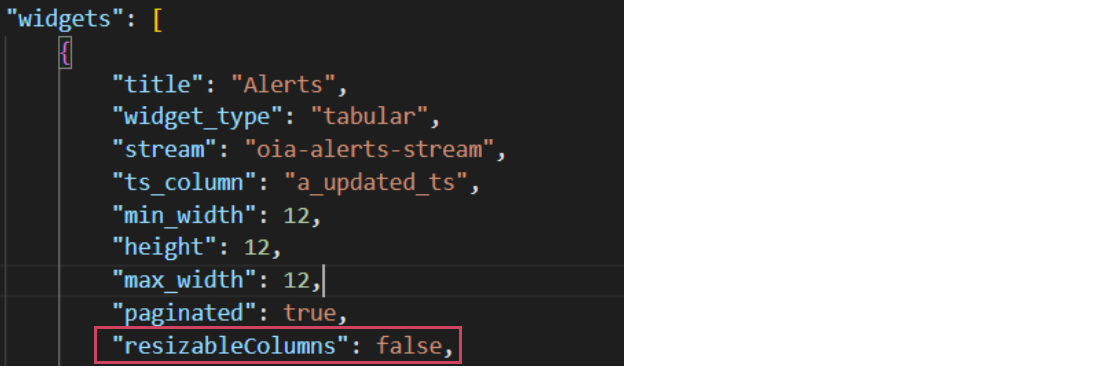
3. By default resizableColumns: false for alerts and incidents tabular report. If you want to resizable for alerts and incidents tabular report then make it true. Go to user Configuration -> RDA Administration -> User Dashboards then search below Dashboard
a) oia-alert-group-view-alerts-os
b) oia-alert-group-view-details-os
c) oia-alert-groups-os
d) oia-alert-tracking-os
e) oia-alerts-os
f) oia-event-tracking-os
g) oia-event-tracking-view-alerts
h) oia-incident-alerts-os
i) oia-view-alerts-policy
j) oia-view-groups-policy
k) incident-collaboration
l) oia-incidents-os-template
m) oia-incidents-os
n) oia-incidents
o) oia-my-incidents
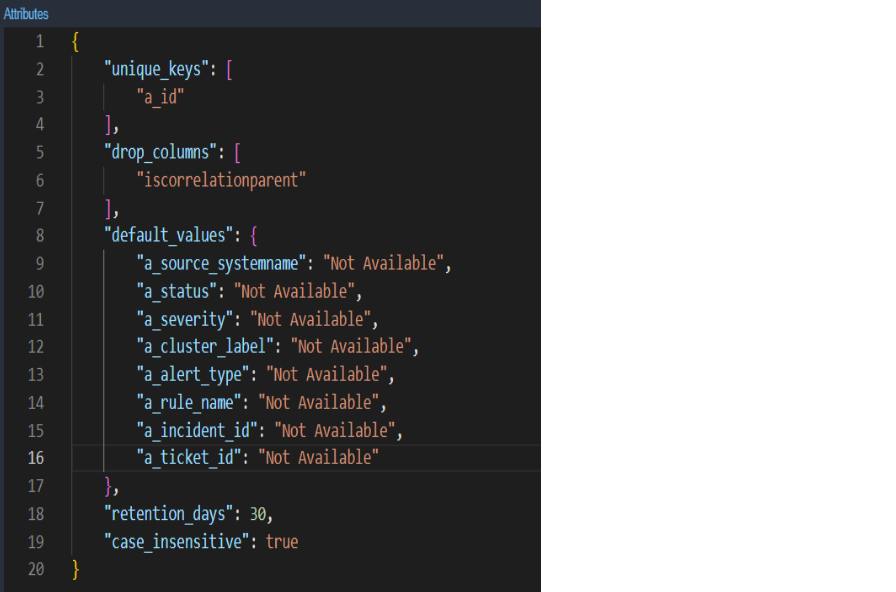
4. Update oia-alerts-stream pstream definition to have default values for a_ticket_id as Not Available.(RDA Administration → Persistent Stream → oia-alerts stream → Edit)

1. Deploy latest l1&l2 bundles. Go to Configuration --> RDA Administration --> Bundles --> Select oia_l1_l2_bundle and Click on deploy action
2. Enable ML experiments manually if any experiments are configured Organization --> Configuration --> ML Experiments
3. Update oia-alerts-stream pstream definition to have default values for a_ticket_id as Not Available.(RDA Administration → Persistent Stream → oia-alerts stream → Edit)
4. By default resizableColumns: false for alerts and incidents tabular report. If you want to resizable for alerts and incidents tabular report then make it true. Go to user Configuration -> RDA Administration -> User Dashboards then search below Dashboard
a) oia-alert-group-view-alerts-os
b) oia-alert-group-view-details-os
c) oia-alert-groups-os
d) oia-alert-tracking-os
e) oia-alerts-os
f) oia-event-tracking-os
g) oia-event-tracking-view-alerts
h) oia-incident-alerts-os
i) oia-view-alerts-policy
j) oia-view-groups-policy
k) incident-collaboration
l) oia-incidents-os-template
m) oia-incidents-os
n) oia-incidents
o) oia-my-incidents
1.4.2 DNAC
1. Deploy latest dna_center_bundle bundle from Configuration → RDA Integrations → Bundles → Click deploy action row level for dna_center_bundle.
2. Upload latest dictionaries of device_family_alias and dnac_building dictionaries
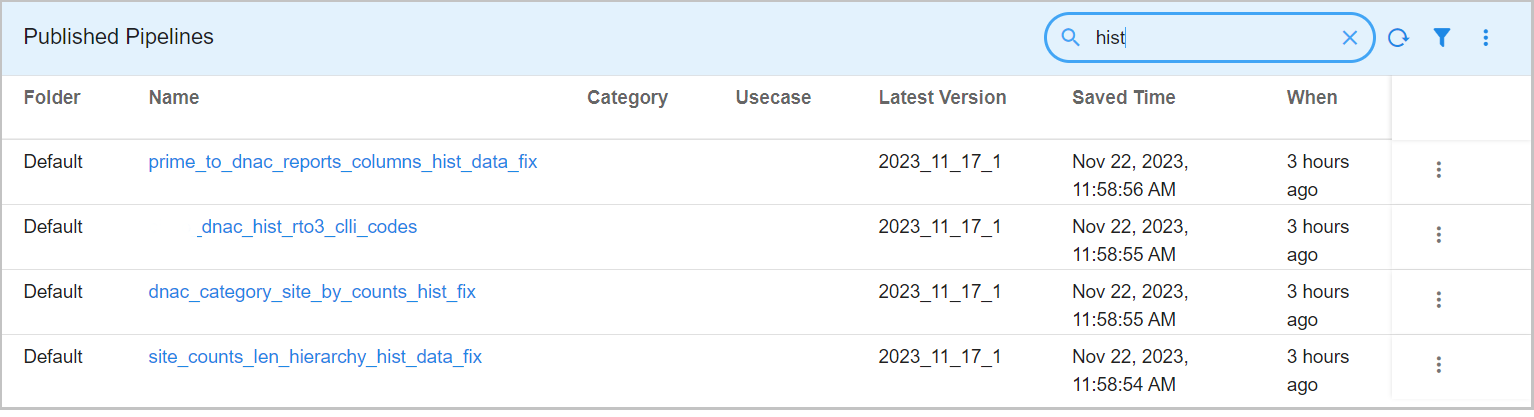
3. Need to Run Historical Data pipelines (4 of them) which are in published pipelines. All these pipelines need to be executed based on the data and by changing the query for a specific set of data to be filtered and execute the pipeline on specific rows.
4. Once Historical data pipelines execution is successfully completed (which might take a couple of hours to complete), We need to delete all 4 pipelines as shown in the screenshot.
Note
Update the schedule timings in Service Blueprints after the deployment as per the requirement.