Offline MetalLB Installation & Upgrade Guide
This document outlines the procedure for on-prem registry based installing & upgrading the MetalLB on a Kubernetes cluster, enabling external access to the RDAF Platform’s application services.
1.Pre-requisites
-
Ensure the CLI version is 1.4.1.1. Verify that the installation or upgrade of the registry is successful.
-
Check if the namespace
rda-fabricexists, using the command given below
- create namespace
rda-fabricusing the below given command if it doesn't exist.
-
The Kubernetes cluster's kube-proxy service should be configured with IPVS settings, enabling strict ARP. Enabling
strictARP: trueensures that kube-proxy in IPVS mode correctly handles ARP responses for services with virtual IPs, preventing traffic from being sent to the wrong node. -
Run the following command to edit the configmap of
kube-proxyservice.
- Modify
strictARPand set totrue, and save the changes.
ipvs:
  excludeCIDRs: null
  minSyncPeriod: 0s
  scheduler: ""
  strictARP: true
  syncPeriod: 0s
  tcpFinTimeout: 0s
- Run the following command to apply the change to
kube-proxyservice
- Run the following command to verify all of the
kube-proxypods are restarted
2. Extract MetalLB Installation File
- Download the metallb installation file from the following link
wget https://macaw-amer.s3.us-east-1.amazonaws.com/releases/rdaf-platform/1.4.1/metallb-installation.tar.gz
- Untar the file using below command
3. Configure IP Address Pool
- Edit the
ipaddresspool.yamlfile inside the extracted metallb-installation directory
Replace the IP placeholder (${IP}) with the actual VIP (Virtual IP) address of RDAF Platform.
apiVersion: metallb.io/v1beta1
kind: IPAddressPool
metadata:
  name: first-pool
spec:
  addresses:
    - ${IP}-${IP}
---
apiVersion: metallb.io/v1beta1
kind: L2Advertisement
metadata:
  name: example
spec:
  ipAddressPools:
    - first-pool
- And add the Virtual IP as shown below. In this example, 192.168.109.21 used as Virtual IP for a reference only.
vi ipaddresspool.yaml
apiVersion: metallb.io/v1beta1
kind: IPAddressPool
metadata:
  name: first-pool
spec:
  addresses:
    - 192.168.109.21-192.168.109.21
---
apiVersion: metallb.io/v1beta1
kind: L2Advertisement
metadata:
  name: example
spec:
  ipAddressPools:
    - first-pool
4. Configure Metallb Helm Values
- Open
metallb-values.yamland change the replica
  tag:
  pullPolicy:
strategy:
  type: RollingUpdate
replicas: ${REPLICAS}
serviceAccount:
  create: true
  name: ""
  annotations: {}
securityContext:
  runAsNonRoot: true
  runAsUser: 65534
  fsGroup: 65534
resources: {}
nodeSelector:
  rdaf_infra_haproxy: allow
labels:
  app: rda-fabric-services
  app_category: rdaf-infra
  app_component: rda-metallb
livenessProbe:
  enabled: true
  failureThreshold: 3
  initialDelaySeconds: 10
  periodSeconds: 10
  successThreshold: 1
  timeoutSeconds: 1
readinessProbe:
- Replica value should be 1 for standalone and 2 for HA
vi metallb-values.yaml
rbac:
  create: true
controller:
  enabled: true
  logLevel: info
  image:
    repository: quay.io/metallb/controller
    tag:
    pullPolicy:
  strategy:
    type: RollingUpdate
  replicas: 2
serviceAccount:
  create: true
5. Label Required RDAF Kubernetes Worker Nodes
- Add the following node labels to the Kubernetes worker node where the current HAProxy instances are running:
rdaf_infra_haproxy=allow
rdaf_infra_services=allow
Run the command below get the RDAF Infra VM IPs on which the current HAProxy instances are running.
Run the following command to list the current Kubernetes worker nodes along with their names and IP addresses:
Run the following command to add the node labels.
kubectl label node <k8s_worker_node_name1> rdaf_infra_haproxy=allow
kubectl label node <k8s_worker_node_name1> rdaf_infra_services=allow
kubectl label node <k8s_worker_node_name2> rdaf_infra_haproxy=allow
kubectl label node <k8s_worker_node_name2> rdaf_infra_services=allow
Run the following command to verify the Node labels are applied.
6. Install MetallB
6.1 Download the MetalLB.tar File
- Download the
MetalLB.tarfiles to the registry VM using the commands below.
wget https://macaw-amer.s3.us-east-1.amazonaws.com/releases/rdaf-platform/1.5.0/metallb-controller.tar
- Copy the tar files to import folder ,the specified path on the registry VM using the below given command.
6.2 Verify TAR Files
- Check that the tar files were copied successfully.
rdauser@kubofflinereg10812:/opt/rdaf-registry/import$ ls
metallb-controller.tar  metallb-frr.tar  metallb-speaker.tar
6.3 Import TAR Files
- Use the following commands to import the images into the registry
2026-02-03 07:23:51,651 [rdaf.component.dockerregistrymirror] INFO     - time="2026-02-03T07:23:51Z" level=warning msg="'--tls-verify' is deprecated, instead use: --src-tls-verify, --dest-tls-verify"
.
.
2026-02-03 07:23:51,706 [rdaf.component.dockerregistrymirror] INFO     - Docker import of frrouting/frr:9.1.0 completed.
2026-02-03 07:24:20,313 [rdaf.component.dockerregistrymirror] INFO     - time="2026-02-03T07:24:20Z" level=warning msg="'--tls-verify' is deprecated, instead use: --src-tls-verify, --dest-tls-verify"
.
.
2026-02-03 07:24:20,454 [rdaf.component.dockerregistrymirror] INFO     - Docker import of metallb/speaker:v0.14.9 completed.
2026-02-03 07:24:26,212 [rdaf.component.dockerregistrymirror] INFO     - time="2026-02-03T07:24:26Z" level=warning msg="'--tls-verify' is deprecated, instead use: --src-tls-verify, --dest-tls-verify"
.
.
2026-02-03 07:24:26,307 [rdaf.component.dockerregistrymirror] INFO     - Docker import of metallb/controller:v0.14.9 completed.
6.4 Verify the Imported Images
- List the tags of all images to ensure they were imported correctly using the below given command
2026-02-03 07:24:36,885 [rdaf.component.dockerregistrymirror] INFO     - querying for tags of all images...

--------------------------------------------------------+
| Service-Name                             | Tags                                                                          |
+------------------------------------------+-------------------------------------------------------------------------------+
| frrouting/frr                            | 9.1.0                                                                         |
+------------------------------------------+-------------------------------------------------------------------------------+
| metallb/controller                       | v0.14.9                                                                       |
+------------------------------------------+-------------------------------------------------------------------------------+
| metallb/speaker                          | v0.14.9                                                                       |
+------------------------------------------+-------------------------------------------------------------------------------+
6.5 Backup the Current Values File
- Go to the path where metallb-values.yaml file exists and take the backup
6.6 Replace quay.io with Onprem-registry
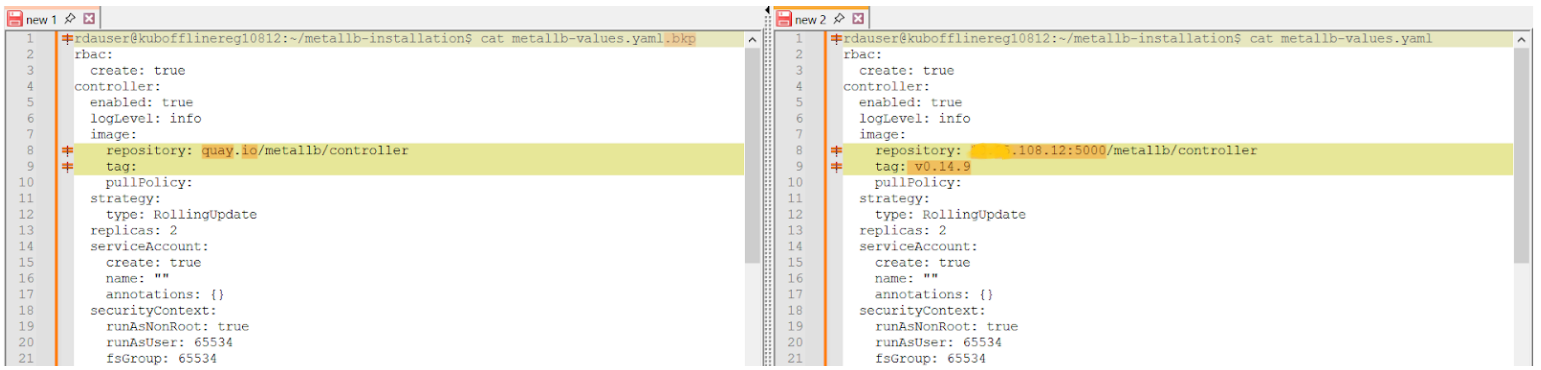
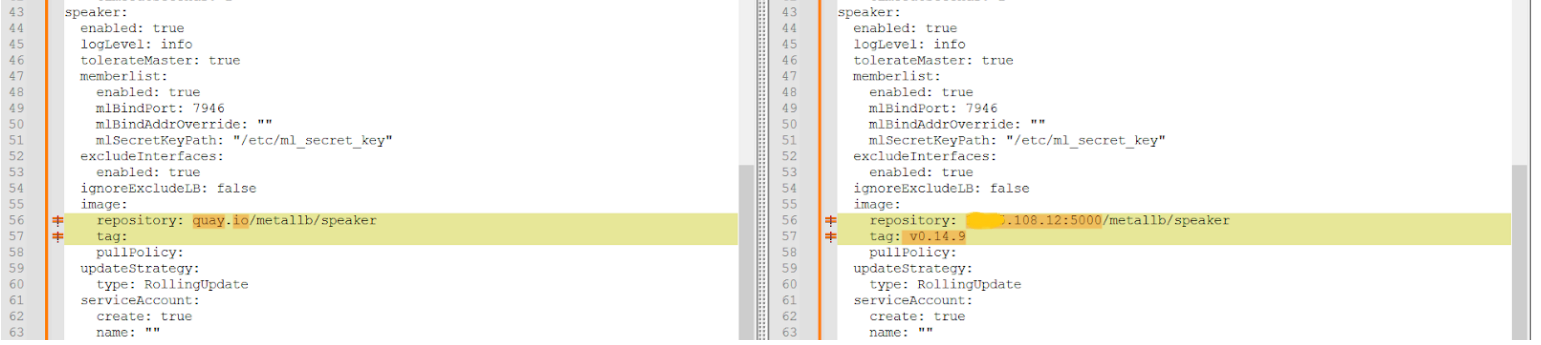
- Replace
quay.iowith onprem-registry and add the tag in the three locations shown in the screenshots below

6.7 MetalLB Install / Upgrade
Note
Change the namespace if it differs from rda-fabric.
- Use the following Helm command to Fresh Install.
NAME: rda-metallb
LAST DEPLOYED: Thu May 15 14:58:29 2025
NAMESPACE: rda-fabric
STATUS: deployed
REVISION: 1
TEST SUITE: None
NOTES:
MetalLB is now running in the cluster.

Now you can configure it via its CRs. Please refer to the metallb official docs on how to use the Crs
kubectl get po -n rda-fabric | grep metallb
rda-metallb-controller-579b4967cf-vc59j   1/1   Running   0   23s
rda-metallb-speaker-4g7cz                 2/4   Running   0   23s
rda-metallb-speaker-k9lmf                 4/4   Running   0   23s
rda-metallb-speaker-nxfnr                 0/4   PodInitializing   0   23s
kubectl get po -n rda-fabric | grep metallb
rda-metallb-controller-579b4967cf-vc59j   1/1   Running   0   25s
rda-metallb-speaker-4g7cz                 2/4   Running   0   25s
rda-metallb-speaker-k9lmf                 4/4   Running   0   25s
rda-metallb-speaker-nxfnr                 4/4   Running   0   25s
Note
Change the namespace if it differs from rda-fabric.
- Use the following Helm command to upgrade MetalLB.
Release "rda-metallb" has been upgraded. Happy Helming!
NAME: rda-metallb
LAST DEPLOYED: Tue Feb  3 07:29:20 2026
NAMESPACE: rda-fabric
STATUS: deployed
REVISION: 2
TEST SUITE: None
NOTES:
MetalLB is now running in the cluster.

Now you can configure it via its CRs. Please refer to the metallb official docs on how to use the CRs.
6.8 Verify the pod status
- Use the following command to verify the pod status
NAME                                     READY   STATUS            RESTARTS       AGE
rda-metallb-controller-b7d4fb99b-52fcc   1/1     Running           0              24s
rda-metallb-controller-b7d4fb99b-56kbb   1/1     Running           0              44s
rda-metallb-speaker-b2v87                4/4     Running           9 (155m ago)   13d
rda-metallb-speaker-g9zrm                4/4     Running           0              24s
rda-metallb-speaker-gdk9l                4/4     Running           5 (7d3h ago)   13d
rda-metallb-speaker-h4lng                4/4     Running           5 (7d3h ago)   13d
rda-metallb-speaker-jgxg7                4/4     Running           5 (7d3h ago)   13d
rda-metallb-speaker-mk8dg                4/4     Running           0              44s
rda-metallb-speaker-q4lq6                0/4     PodInitializing   0              4s
6.9 Verify the Images
- Use the following commands to verify the images
- Use this command to display the container image(s) used by the rda-metallb-speaker daemonset.
image: 192.168.108.12:5000/metallb/speaker:v0.14.9
imagePullPolicy: IfNotPresent
image: 192.168.108.12:5000/frrouting/frr:9.1.0
imagePullPolicy: IfNotPresent
image: 192.168.108.12:5000/frrouting/frr:9.1.0
imagePullPolicy: IfNotPresent
image: 192.168.108.12:5000/frrouting/frr:9.1.0
imagePullPolicy: IfNotPresent
image: 192.168.108.12:5000/frrouting/frr:9.1.0
imagePullPolicy: IfNotPresent
image: 192.168.108.12:5000/metallb/speaker:v0.14.9
imagePullPolicy: IfNotPresent
image: 192.168.108.12:5000/metallb/speaker:v0.14.9
imagePullPolicy: IfNotPresent