Collaboration Data migration from Database to Pstream
From the RDAF Platform's 3.5 / 7.5 (App) and above releases, the Collaboration Application Service no longer uses the MariaDB database to persist data. Instead, it now uses persistent streams, which are backed by OpenSearch index store.
Before upgrading the RDAF Platform to version 3.5 / 7.5 or above, it is mandatory to migrate the existing data from the Collaboration Application Service's database to persistent streams as a prerequisite.
The document below provides steps on how to migrate the data.
1. Prerequisites
For 3.7.2/7.7.2 upgrade, Please download the collab-3.5-v052425-upgrade.tar.gz file below, which contains a sequence of automated scripts to migrate the collaboration data from the database.
For 3.5/7.5 upgrade, Please download the collab-3.5-v020425-upgrade.tar.gz file below, which contains a sequence of automated scripts to migrate the collaboration data from the database.
Warning
Data migration scripts should be downloaded to RDAF deployment CLI VM from which rdaf setup (non-k8s) or rdafk8s setup (k8s) initially was executed to setup and configure the RDAF platform.
The scripts expect the following files to be present on the RDAF deployment CLI VM:
/opt/rdaf/rdaf.cfg/opt/rdaf/config/network_config/config.json/usr/local/bin/mc
Use the following command to confirm if jq exits in RDAF deployment CLI VM.
Note: Please do not proceed without validating above.
Note
This is Applicable for upgrade 3.4.2 to 3.7.2(Latest Version's)
Login into RDAF Deployment CLI VM as rdauser using SSH client:
Download the collab-3.5-v052425-upgrade.tar.gz file using the command below.
wget https://macaw-amer.s3.us-east-1.amazonaws.com/releases/rdaf-platform/1.3.3/collab-3.5-v052425-upgrade.tar.gz
Untar the downloaded file collab-3.5-v052425-upgrade.tar.gz using the command below.
Note
This is Applicable for upgrade 3.4.2 to 3.5/3.7(Earlier Version's)
Login into RDAF Deployment CLI VM as rdauser using SSH client:
Download the collab-3.5-v020425-upgrade.tar.gz file using the command below.
wget https://macaw-amer.s3.us-east-1.amazonaws.com/releases/rdaf-platform/1.3.2/collab-3.5-v020425-upgrade.tar.gz
collab-3.5-v020425-upgrade.tar.gz using the command below.
- Change the directory to collab-3.5-upgrade
The collab-3.5-upgrade directory contains the following scripts, which will be used for migrating the Collaboration service's data, along with other supporting files.
- 00_load_config.sh: Captures configuration data from
/opt/rdaf/rdaf.confand/opt/rdaf/config/network_configthat is needed for the data migration. - 01_create_mig_streams.sh: Creates temporary pstreams for
oia-incidents-collaboration-stream,oia-incidents-external-tickets-streamandoia-collab-messagesharing-streamwith temp- as the perfix. These temporary pstreams will be used for the initial data migration from the Collaboration service's database. - 02_update_live_streams.sh: Updates the existing Collaboration Service pstream settings, i.e.,
oia-incidents-collaboration-stream,oia-incidents-external-tickets-streamand create a new pstream,oia-collab-messagesharing-stream - 03_export_db_to_csv.sh: Connects to the MariaDB database, exports the Collaboration Service's data into CSV files, and copies them to the RDAF deployment CLI VM.
- 04_import_csv_to_migstream.sh: Ingests the Collaboration Service's data from the CSV files into the temporary Collaboration Service pstreams.
- validate_04_import_csv_to_migstream.sh: Provides the status of data ingestion from CSV files into the pstreams.
- 05_switch_streams.sh: It switches the current Collaboration Service pstreams configuration to use the index of the temporary pstreams into which the data was migrated.
2. Migration Steps
2.1 Create Temporary Pstreams
Change the directory to collab-3.5-upgrade
Run the following command to capture the existing MariaDB database, MinIO, and Tenant configurations, which will be used as inputs for the subsequent scripts.
~/collab-3.5-upgrade$ bash 00_load_config.sh
===============================================================
Loading RDAF Network Config File /opt/rdaf/config/network_config/config.json
\t RDA Network Configuration File, /opt/rdaf/config/network_config/config.json, Accessible. Successful
Loading RDAF Config File /opt/rdaf/rdaf.cfg
\t RDA Configuration File, /opt/rdaf/rdaf.cfg, Accessible. Successful
Created Minio Configuration File, /home/rdauser/.mc/config.json, using {"version": "10", "aliases": {"myminio": {"url": "https://192.168.125.216:9443","accessKey": "rdafadmin","secretKey": "********","api": "s3v4","path": "auto"}}}
\t Minio Access Validation, myminio, Successful
\t Minio Access Validation, myminio/tenants.e82a1c29fced45b9b80520fc036fc96e, Successful
Created Properties File: -rw-r--r-- 1 rdauser rdauser 1010 Oct 5 02:50 collab_mig.properties
cfg_minio_bucket_name=tenants.e82a1c29fced45b9b80520fc036fc96e
cfg_minio_client_alias=myminio
cfg_tenant_id=e82a1c29fced45b9b80520fc036fc96e
cfg_sql_host=192.168.125.216
cfg_sql_port=3306
cfg_sql_username=rdafadmin
cfg_sql_pwd=********
cfg_collab_db_name=e82a1c29fced45b9b80520fc036fc96e_cfxdimensions_app_collaboratio
cfg_collab_msgs_stream_name=temp-oia-incidents-collaboration-stream
cfg_collab_msgs_stream_index=e82a1c29fced45b9b80520fc036fc96e-stream-klug58ih-oia-incidents-collaboration-stream
cfg_collab_msgsharing_stream_name=temp-oia-collab-messagesharing-stream
cfg_collab_msgsharing_stream_index=e82a1c29fced45b9b80520fc036fc96e-stream-klug58ih-oia-collab-messagesharing-stream
cfg_collab_exttkt_stream_name=temp-oia-incidents-external-tickets-stream
cfg_collab_exttkt_stream_index=e82a1c29fced45b9b80520fc036fc96e-stream-klug58ih-oia-incidents-external-tickets-stream
cfg_lines_per_split_file=2000000
cfg_files_per_batch=1
cfg_ingest_next_batch_using_prompt=False
cfg_ingest_next_batch_delay_secs=30
Run the following command to create temporary pstreams for oia-incidents-collaboration-stream, oia-incidents-external-tickets-stream and oia-collab-messagesharing-stream with temp- as the perfix. These temporary pstreams will be used for the initial data migration from the Collaboration service's database.
Temporary pstream names:
- temp-oia-incidents-collaboration-stream
- temp-oia-incidents-external-tickets-stream
- temp-oia-collab-messagesharing-stream
================ validate-01-create-mig-streams START ================
---Checking temp-oia-incidents-collaboration-stream stream configuration
Final Status:True, Stream: temp-oia-incidents-collaboration-stream,      Key 'unique_keys' - Success,    Key 'properties' - Success,     Key 'index_name' - Success,
---Checking temp-oia-collab-messagesharing-stream stream configuration
Final Status:True, Stream: temp-oia-collab-messagesharing-stream,        Key 'properties' - Success,     Key 'index_name' - Success,
---Checking temp-oia-incidents-external-tickets-stream stream configuration
Final Status:True, Stream: temp-oia-incidents-external-tickets-stream,   Key 'unique_keys' - Success,    Key 'properties' - Success,     Key 'index_name' - Success,
================ validate-01-create-mig-streams END ================
Warning
Please proceed to next step only if you see no failure status message from the above script's output
2.2 Update Existing Pstreams
Run the following command to update the existing Collaboration Service pstream settings of unique_keys and field mapping parameters, i.e., oia-incidents-collaboration-stream, oia-incidents-external-tickets-stream and create a new pstream, oia-collab-messagesharing-stream
================ validate-02-update-live-streams START ================
---Checking oia-incidents-collaboration-stream stream configuration
Final Status:True, Stream: oia-incidents-collaboration-stream,   Key 'unique_keys' - Success,    Key 'properties' - Success,     Key 'index_name' - Success,
---Checking oia-collab-messagesharing-stream stream configuration
Final Status:True, Stream: oia-collab-messagesharing-stream,     Key 'properties' - Success,     Key 'index_name' - Success,
---Checking oia-incidents-external-tickets-stream stream configuration
Final Status:True, Stream: oia-incidents-external-tickets-stream,        Key 'unique_keys' - Success,    Key 'properties' - Success,     Key 'index_name' - Success,
================ validate-02-update-live-streams END ================
Warning
Please proceed to next step only if you see no failure status message from the above script's output
2.3 Export & Ingest DB Data into Temporary Pstreams
Run the following command to connect to the MariaDB database, export the Collaboration Service's data into CSV files, and copy them to the RDAF deployment CLI VM's /tmp folder.
================ validate-03_export_db_to_csv START Mon Sep  9 00:10:04 UTC 2024 ================
---Checking CSV Files Existence and is not empty
Success. /tmp/collab.db.messages.csv Exists
Success. /tmp/collab.db.irmessagesharing.csv Exists
Success. /tmp/collab.db.teamincident.csv Exists
---Checking CSV File Row Counts Against DB
Success. messages: db.count: 30874, csv.count: 30874, diff_pct: 0, diff_cnt: 0
Success. irmessagesharing: db.count: 15316, csv.count: 15316, diff_pct: 0, diff_cnt: 0
Success. teamincident: db.count: 1949, csv.count: 1949, diff_pct: 0, diff_cnt: 0
================ validate-03_export_db_to_csv END ================
Note
Data export from the database into CSV files may take approximately 10 to 60 minutes or more, depending on the size of the data.
Warning
Please proceed to next step only if you see no failure status message from the above script's output
Run the following command to ingest the Collaboration Service's data from the CSV files into the temporary Collaboration Service pstreams.
Note
Data ingestion from the CSV files into Pstreams may take approximately 10 to 60 minutes or more, depending on the size of the data.
Monitor Data ingestion status:
Run the following command multiple times until the CSV data count matches the ingested data count in the pstreams.
================ validate-04_import_csv_to_migstream START ================
Loading File: all
-----------Validating Data Load in to temp-oia-incidents-collaboration-stream -----------
Stream: temp-oia-incidents-collaboration-stream. CSV Row Count: 30874, Total Ingested in last 60 minutes: 30874, Total Rows In the Stream: 30993
-----------Validating Data Load in to temp-oia-collab-messagesharing-stream -----------
Stream: temp-oia-collab-messagesharing-stream. CSV Row Count: 15316, Total Ingested in last 60 minutes: 15316, Total Rows In the Stream: 15316
-----------Validating Data Load in to temp-oia-incidents-external-tickets-stream -----------
Stream: temp-oia-incidents-external-tickets-stream. CSV Row Count: 1949, Total Ingested in last 60 minutes: 45089, Total Rows In the Stream: 1949
================ validate-04_import_csv_to_migstream END ================
Warning
Please proceed to the next step only after verifying that the data has been successfully ingested into the temporary pstreams.
2.4 Switch Live Pstream Indexes
Run the following command to switch the current Collaboration Service pstreams configuration to use the index of the temporary pstreams into which the data was migrated.
================ validate_05_switch_streams START ================
Validating Message Stream NewLive, OldLive, UniqueKeys, Properties and Index
Final Status:True, Stream: oia-incidents-collaboration-stream,   Key 'unique_keys' - Success,    Key 'properties' - Success,     Key 'index_name' - Success,
Final Status:True, Stream: oia-incidents-collaboration-stream-oldlive,   Key 'index_name' - Success,
Validating MessageSharing Stream  NewLive, OldLive, UniqueKeys, Properties and Index
Final Status:True, Stream: oia-collab-messagesharing-stream,     Key 'properties' - Success,     Key 'index_name' - Success,
Final Status:True, Stream: oia-collab-messagesharing-stream-oldlive,     Key 'index_name' - Success,
Validating ExternalTicket Stream  NewLive, OldLive, UniqueKeys, Properties and Index
Final Status:True, Stream: oia-incidents-external-tickets-stream,        Key 'unique_keys' - Success,    Key 'properties' - Success,     Key 'index_name' - Success,
Final Status:True, Stream: oia-incidents-external-tickets-stream-oldlive,        Key 'index_name' - Success,
================ validate_05_switch_streams END ================
Warning
Please proceed to next step only if you see no failure status message from the above script's output
2.5. Copy Delta Data From OldLive to NewLive
During the data migration process, the RDAF platform will receive incoming data from the time the export started until it is completed. The pipeline below will copy the delta data from the old pstream to the current live pstream.
Create Pipeline:
Login into RDAF platform's portal and go to Main Menu --> Configuration --> RDA Administration --> Pipelines --> Draft Pipelines --> Click on Add with Text button
Pipeline Name: collab-oldlive-to-newlive-bydate
Version: 01
%% stream = no and limit = 0

## collab-oldlive-to-newlive-bydate
## MAKE SURE TO CHANGE THE TIMESATMP AS NEEDED.
## Option1: From the time Switch was performed in UTC. It is ok to be rounded to the nearest hour. If it is with in last 4 hours the use "-4 hours"
## Option2: From the Max Time of CSV Exported Data
##

--> @c:new-block
   --> @dm:empty
   --> @dm:addrow name="oia-incidents-collaboration-stream-oldlive" & limit=0 & sort_by_col="timestamp" & sort_type="asc"
   --> #dm:query-persistent-stream timestamp is after -4 hours
   --> @dm:skip-block-if-shape row_count=0
   --> @dm:check-columns must_contain="incidentid" & action="skip-block"
   --> @dm:change-time-format columns="createdat,updatedat" & from_format="datetimestr" & to_format="datetimestr"
   --> @dm:copy-columns to="timestamp" & from="updatedat"
   --> @dm:fixnull-regex
   --> @rn:write-stream name="oia-incidents-collaboration-stream"
   --> @dm:save name="collab-ol2nl-messages"


--> @c:new-block
   --> @dm:empty
   --> @dm:addrow name="oia-incidents-external-tickets-stream-oldlive" & limit=0 & sort_by_col="timestamp" & sort_type="asc"
   --> #dm:query-persistent-stream timestamp is after -4 hours
   --> @dm:check-columns must_contain="incident_id" & action="skip-block"
   --> @dm:to-type columns="shared_time" & type="int"
   --> @dm:change-time-format columns="shared_time" & from_format="ms" & to_format="datetimestr"
   --> @dm:copy-columns to="timestamp" & from="shared_time"
   --> @dm:fixnull-regex
   --> @rn:write-stream name="oia-incidents-external-tickets-stream"
   --> @dm:save name="collab-ol2nl-teamincidents"
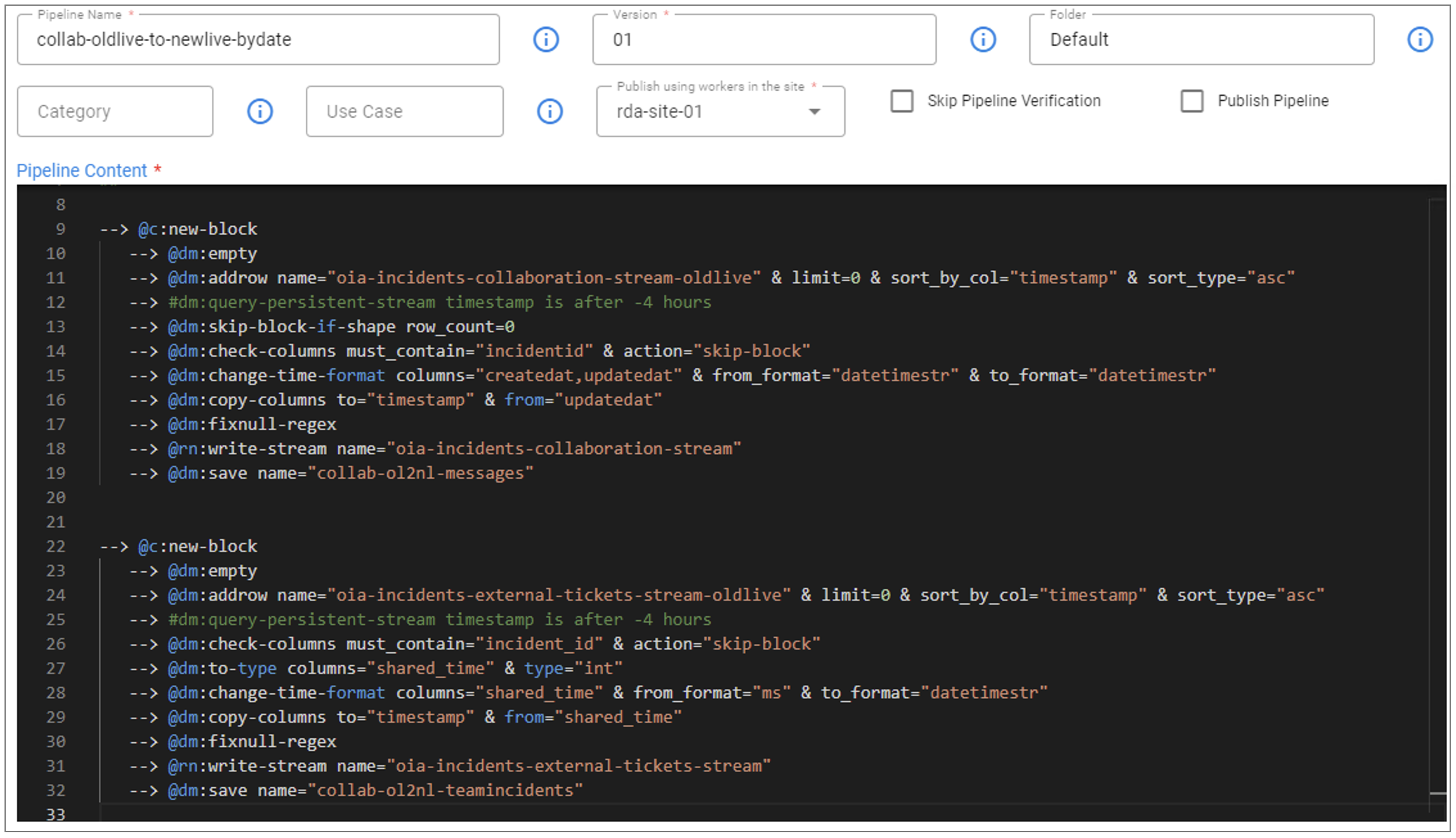
Execute the collab-oldlive-to-newlive-bydate pipeline and monitor the pipeline traces after submission. Wait until the pipeline completes successfully.
3. Post 3.5/7.5 & 3.7.2/7.7.2 Upgrade Steps
3.1. Copy delta Data from DB to Messagesharing pstream
Collaboration Service's pstream oia-collab-messagesharing-stream is newly created which will be used to ingest the new data only after upgrading the RDAF platform to 3.5/7.5 & 3.7.2/7.7.2 release.
During the data migration process, the RDAF platform will receive incoming data from the time the export started until the upgrade is completed. The pipeline below will copy the delta data from the database to the pstream oia-collab-messagesharing-stream.
Prerequisites for the pipeline:
The RDAF platform's MariaDB cluster credentials need to be added in the UI. Please run the following commands on RDAF deployment CLI VM, to retrieve the MariaDB cluster configuration, including the Host IP, Username, and Password.
MARIADB_HOST=`cat /opt/rdaf/rdaf.cfg | grep -A3 mariadb | grep datadir | awk '{print $3}' | cut -f1 -d'/'`
MARIADB_USER=`cat /opt/rdaf/rdaf.cfg | grep -A3 mariadb | grep user | awk '{print $3}' | base64 -d`
MARIADB_PASSWORD=`cat /opt/rdaf/rdaf.cfg | grep -A3 mariadb | grep password | awk '{print $3}' | base64 -d`
Get Collaboration service's Database name.
mysql -u$MARIADB_USER -p$MARIADB_PASSWORD -h $MARIADB_HOST -P3307 -e "show databases;" | grep collab
Run the following command to get max TIMESTAMP from MessageSharing Stream using the path /home/rdauser/collab-3.5-upgrade
--------------------- 06_1_get_msgsharing_dates START ---------------------
Getting max shared_time from MessageSharing Stream
2024-09-12 08:07:26
Note
If there is no data in the MessageSharing Stream, it will return the output as shown below in the Example Output.
--------------------- 06_1_get_msgsharing_dates START ---------------------
Getting DB and CSV Exported Counts
DB Table:irmessagesharing, Row Count:0. CSV Exported Line Count: 0
DB Table irmessagesharing is Empty. DB Data import to Stream temp-oia-collab-messagesharing-stream must have skipped. We don't need to run Pipeline collab-db-to-msgsharing-livestream-bydate
--------------------- 06_1_get_msgsharing_dates END ---------------------
Create MariaDB Credentials:
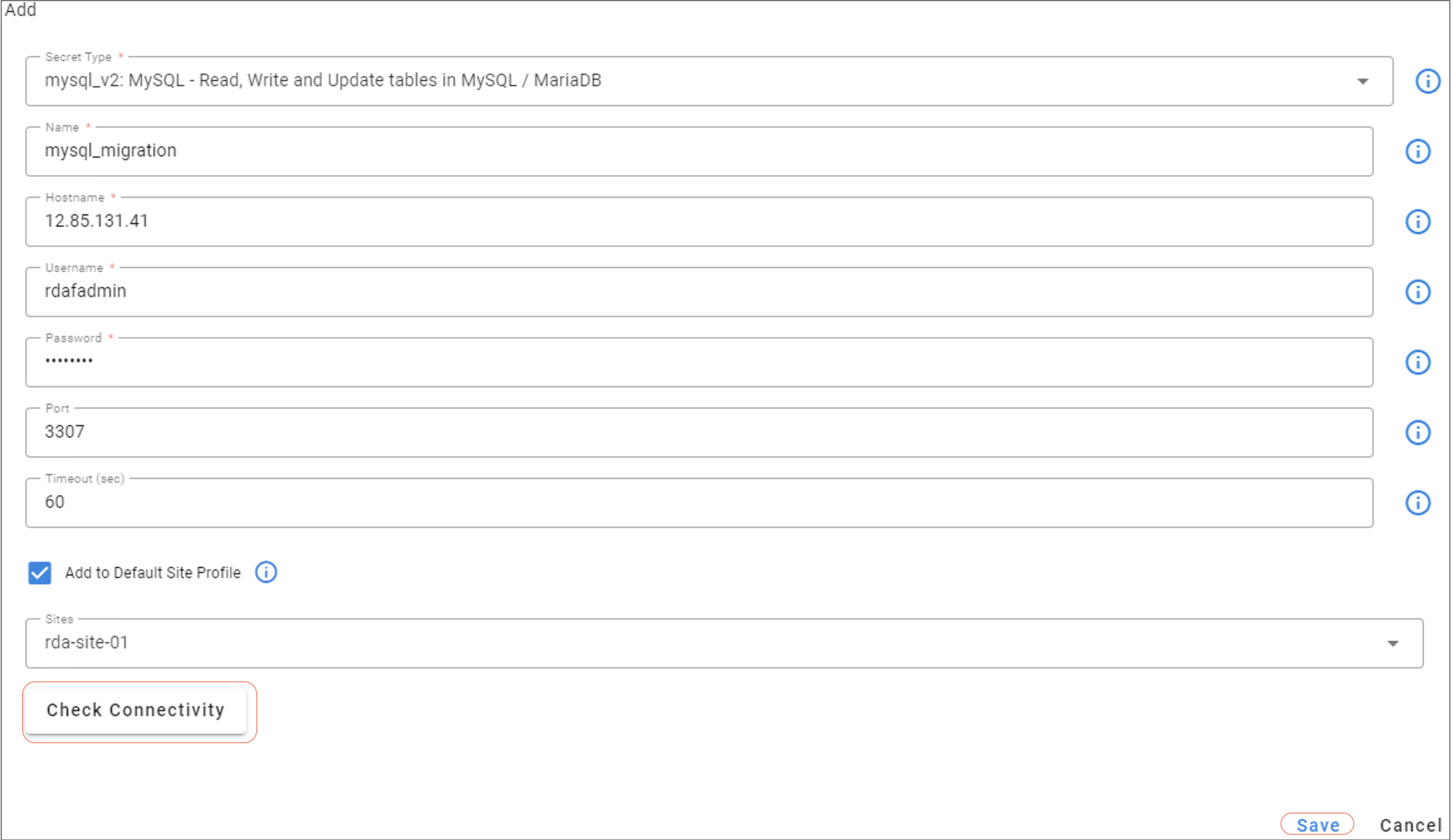
Login into RDAF platform's portal and go to Main Menu --> Configuration --> RDA Integrations --> Credentials --> Click on Add button and select mysql_v2 as secret type to enter the MariaDB credentials.
- Name: Enter name as mysql_migration
- Hostname: IP Address of MariaDB Database (Copy it from the above)
- Username: Username MariaDB Database (Copy it from the above)
- Password: Password of MariaDB Database (Copy it from the above)
- Port: Enter 3307 as port
- Sites: Select the RDA Worker group
Click on Check Connectivity to make sure you get OK status and click on Save button to add the credentials.
Warning
Please proceed to next step only after MariaDB credentials are successfully added and validated in RDAF platform's UI.
Create Pipeline:
Login into RDAF platform's portal and go to Main Menu --> Configuration --> RDA Administration --> Pipelines --> Draft Pipelines --> Click on Add with Text button
Pipeline Name: collab-db-to-msgsharing-livestream-bydate
Version: 01
Before saving the pipeline, please update the Collaboration DB name (copy from one of the above step) and adjust the TIMESTAMP field value(copy from the above step), it should be the date and end time (approax) of the data migration activity.
%% stream = no and limit = 0

##
## collab-db-to-msgsharing-livestream-bydate
## Read from irmessahesharing DB table and write to corresponding stream
## prior to 3.5, irmmessagesharing stream is not existing. So only wait to fill the gap is reading from db table
## TIMESTAMP must be UTC
## CHANGES: <Collaboration_DB_Name>, TIMESTAMP
##

--> @c:new-block
   --> @dm:empty
   --> @mysql_migration:native-query dbname="<Collaboration_DB_Name>" & query="select ms.message_id, ms.shared_to_team, ms.type, IFNULL(ms.shared_to,'') as shared_to, IFNULL(ms.shared_by,'') as shared_by, cast((UNIX_TIMESTAMP(ms.shared_time)*1000) as INT) as shared_time, cast((UNIX_TIMESTAMP(ms.shared_time)*1000) as INT) as timestamp, IFNULL(ms.medium,'') as medium, IFNULL(ms.attachment_name,'') as attachment_name, m.customerid, m.projectid, IFNULL(m.incidentid,'') as incidentid from irmessagesharing ms inner join message m on m.messageid=ms.message_id  where m.createdat >= TIMESTAMP('2024-08-14 07:00:00')"
   --> @dm:skip-block-if-shape row_count=0
   --> @dm:check-columns must_contain="incidentid" & action="skip-block"
   --> @dm:selectcolumns exclude="execution_status|execution_reason|attempt_count"
   --> @dm:fixnull-regex
   --> @rn:write-stream name="oia-collab-messagesharing-stream"
   --> @dm:save name="collab-db2nl-messagesharing"
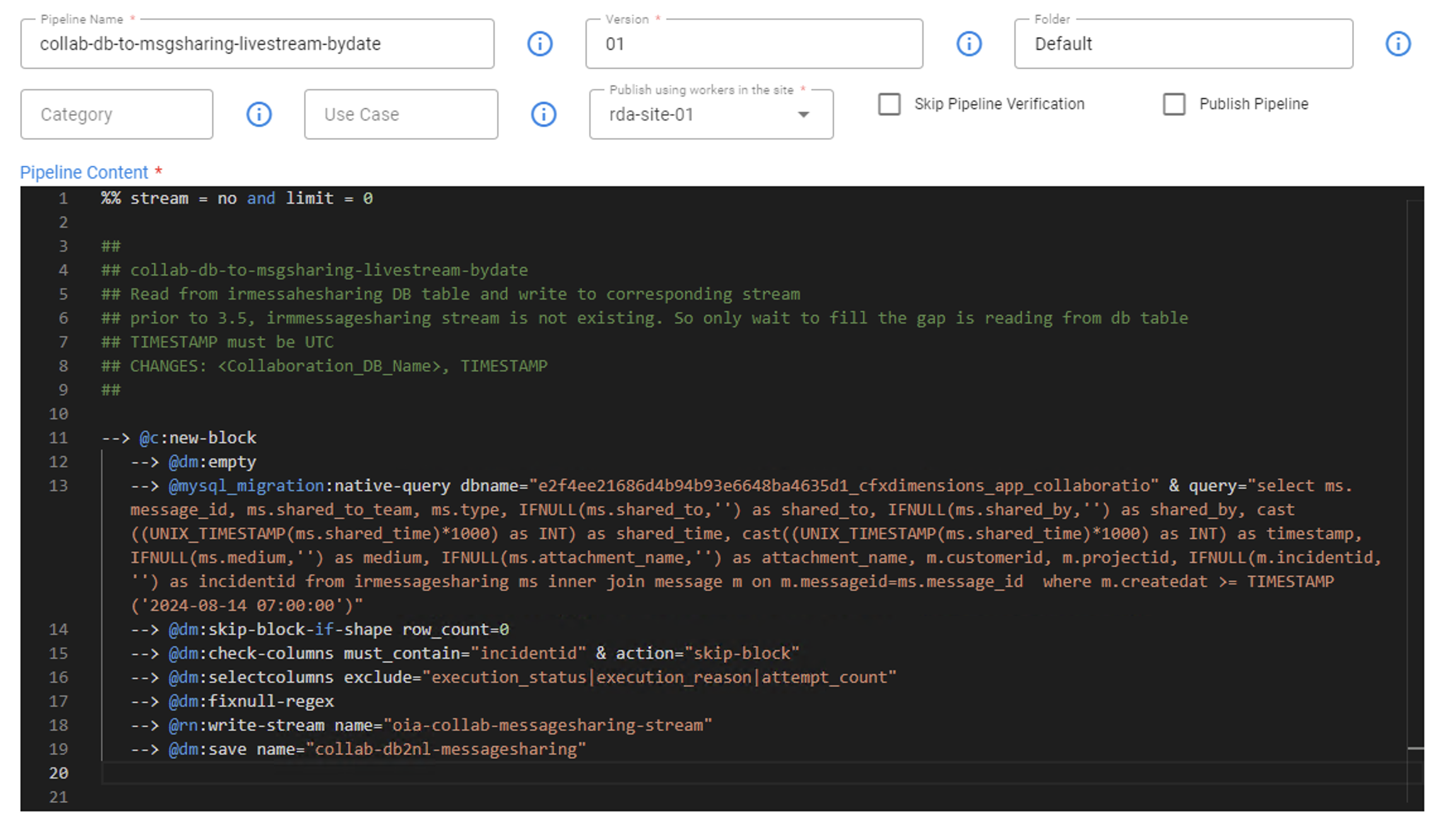
Execute the collab-db-to-msgsharing-livestream-bydate pipeline and monitor the pipeline traces after submission. Wait until the pipeline completes successfully.
3.2 Purging Temporary Streams and Older data
Danger
Please execute the below steps only after contacting CloudFabrix support as below steps are irreversible and can cause data loss.
The Collaboration database tables should only be truncated after the successful 3.5/7.5 or above release upgrade and the application's functionality has been validated.
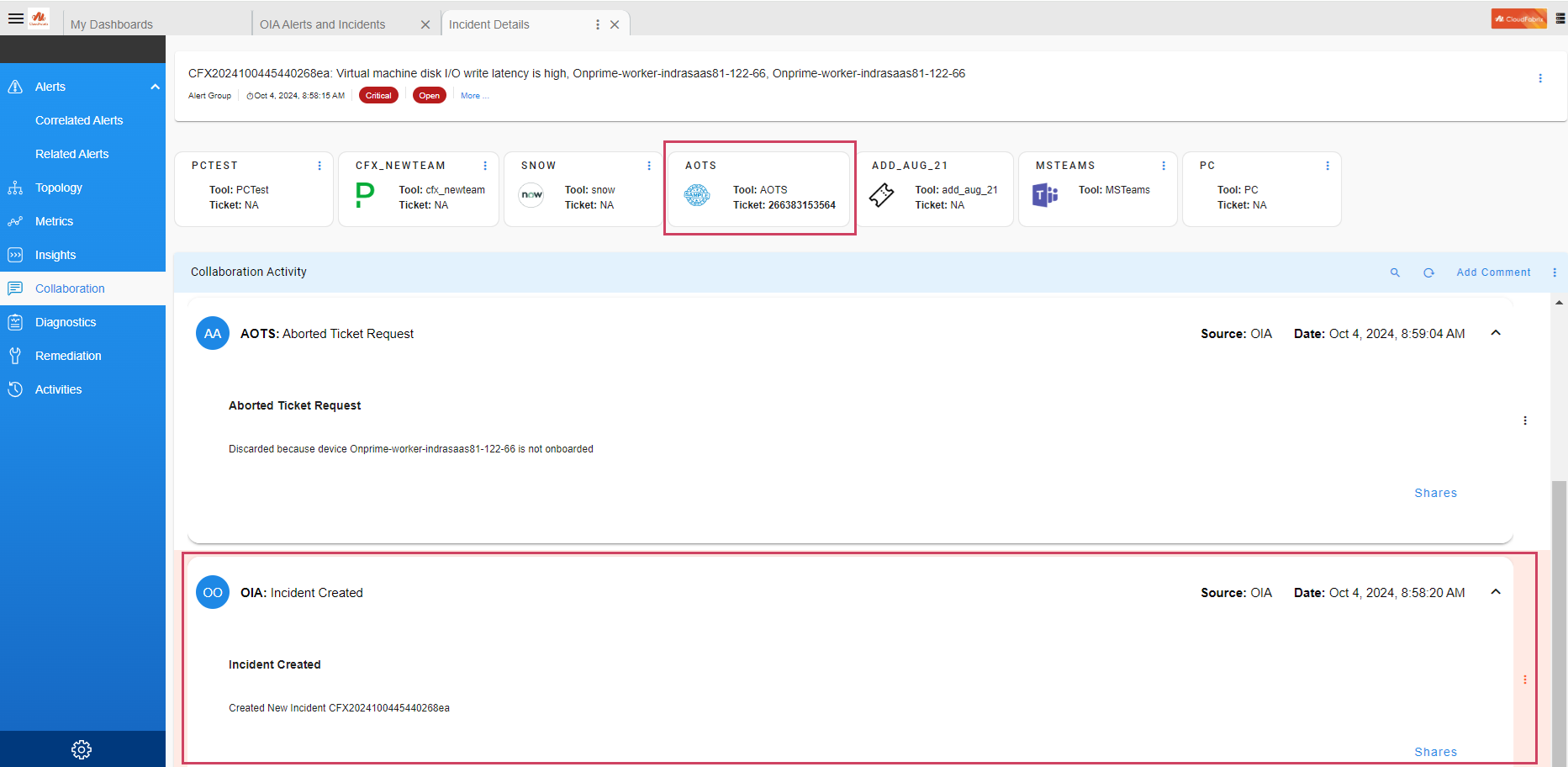
As a part of validation, pick an incident that was created before collaboration migration activity and make sure collaboration page shows all the incident related data. Also pick an incident that was created after the 3.5 or above Upgrade Completion and make sure the collaboration page shows all the Incidents related data. Please refer to the Example mentioned below. If everything seems normal, proceed with the next steps.
Delete Temporary Pstreams:
Delete the temporary Collaboration pstreams following the commands below.
Delete Collaboration DB Tables:
Run the following commands to get MariDB cluster details and truncate the Collaboration service's DB tables.
MARIADB_HOST=`cat /opt/rdaf/rdaf.cfg | grep -A3 mariadb | grep datadir | awk '{print $3}' | cut -f1 -d'/'`
MARIADB_USER=`cat /opt/rdaf/rdaf.cfg | grep -A3 mariadb | grep user | awk '{print $3}' | base64 -d`
MARIADB_PASSWORD=`cat /opt/rdaf/rdaf.cfg | grep -A3 mariadb | grep password | awk '{print $3}' | base64 -d`
COLLAB_DB_NAME=`mysql -u$MARIADB_USER -p$MARIADB_PASSWORD -h $MARIADB_HOST -P3307 -e "show databases;" | grep collab`
Note
Please ignore mysql: [Warning] Using a password on the command line interface can be insecure. message
Truncate DB table message
mysql -u$MARIADB_USER -p$MARIADB_PASSWORD -h $MARIADB_HOST -P3307 -e "use $COLLAB_DB_NAME; truncate message;"
Truncate DB table irmessagesharing
mysql -u$MARIADB_USER -p$MARIADB_PASSWORD -h $MARIADB_HOST -P3307 -e "use $COLLAB_DB_NAME; truncate irmessagesharing;"
Truncate DB table teamincident
mysql -u$MARIADB_USER -p$MARIADB_PASSWORD -h $MARIADB_HOST -P3307 -e "use $COLLAB_DB_NAME; truncate teamincident;"
Delete the Collaboration CSV data files:
Delete the Collaboration CSV data files from the /tmp folder on RDAF deployment CLI VM.